
Hex Tab: Verify File Integrity with Hash Values
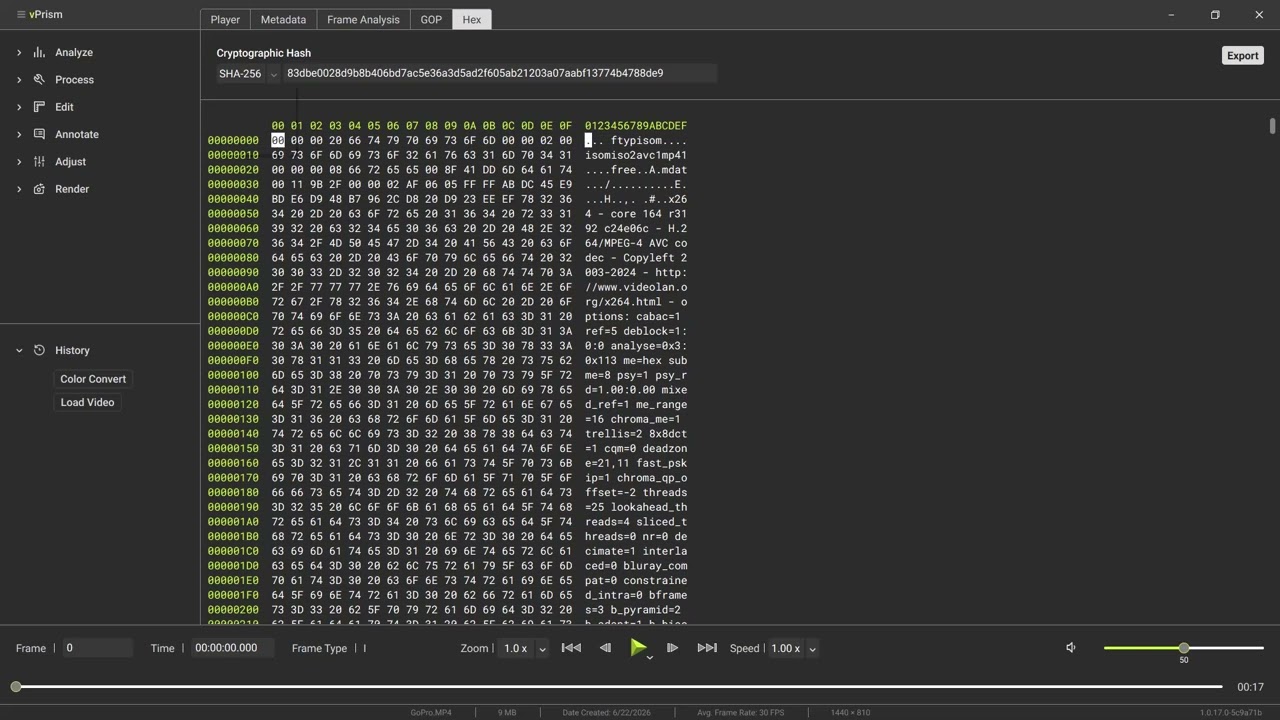
View a video file at the byte level with the Hex tab in vPrism, the most raw view the tool offers. See the offset, hex data, and text columns, then generate a SHA-256, SHA-1, or MD5 hash to document file integrity and support chain of custody for digital evidence.
Transcript
Load a video and click on the Hex tab to display the content of the video file at the byte level. This is the most raw view vPrism offers.
Players and metadata views interpret and decode the file for you. The Hex view shows the underlying bytes exactly how they are stored.
On the left is the offset, which is the address showing how far into the file you are. In the middle is the hex data itself, sixteen bytes per row.
On the right is the text column, showing any bytes that map to printable characters and a dot for non-printable bytes.
Hex is a human-friendly way to represent the binary data in the file. The file is really just bits grouped into bytes. Hex shows each byte as two hexadecimal characters so it is readable, and the text column surfaces any strings present inside those bytes.
At the top, vPrism generates a cryptographic hash of the file. Choose SHA-256, SHA-1, or MD5 from the dropdown and the value is automatically displayed.
A hash value is the digital fingerprint of the file. Change a single byte anywhere in the file and the hash value changes completely.
Document it when you receive video evidence and anyone can re-run the same algorithm later to confirm the file is unchanged, complete, and unaltered since that time. This is a core integrity check that supports chain of custody for digital evidence.
The export button allows you to save the hex output for outside presentation or analysis.
And that's how vPrism lets you see, and verify, exactly what's in your video file.